
A Mac app for church staff and ministry leaders
Ozzie keeps watch over your services, so your hours go to people.
Ozzie reads your church's Planning Center, B1 Church, Breeze or Genesis, keeps watch in the background, and comes to you when something needs a decision. It lays out the facts and drafts the note. You decide, and you send it.
Free and open source, for Apple Silicon Macs with macOS 14 or later. It reads your church's system, changes Planning Center only when you confirm, and never sends anything.
How it works
Hand it a job once. Ozzie keeps watch and comes to you.
Hand it a job
Ask in plain words: “Keep an eye on my services.” Ozzie shows a short plan: what it will watch, which accounts it reads, when it checks, when it tells you, when it stops and how to stop it sooner. Nothing starts until you say “Looks good”.
It keeps watch
Close the window and get on with your day. Ozzie checks your church's system on schedule from the menu bar, within the limits on its plan, and keeps quiet hours.
It comes to you
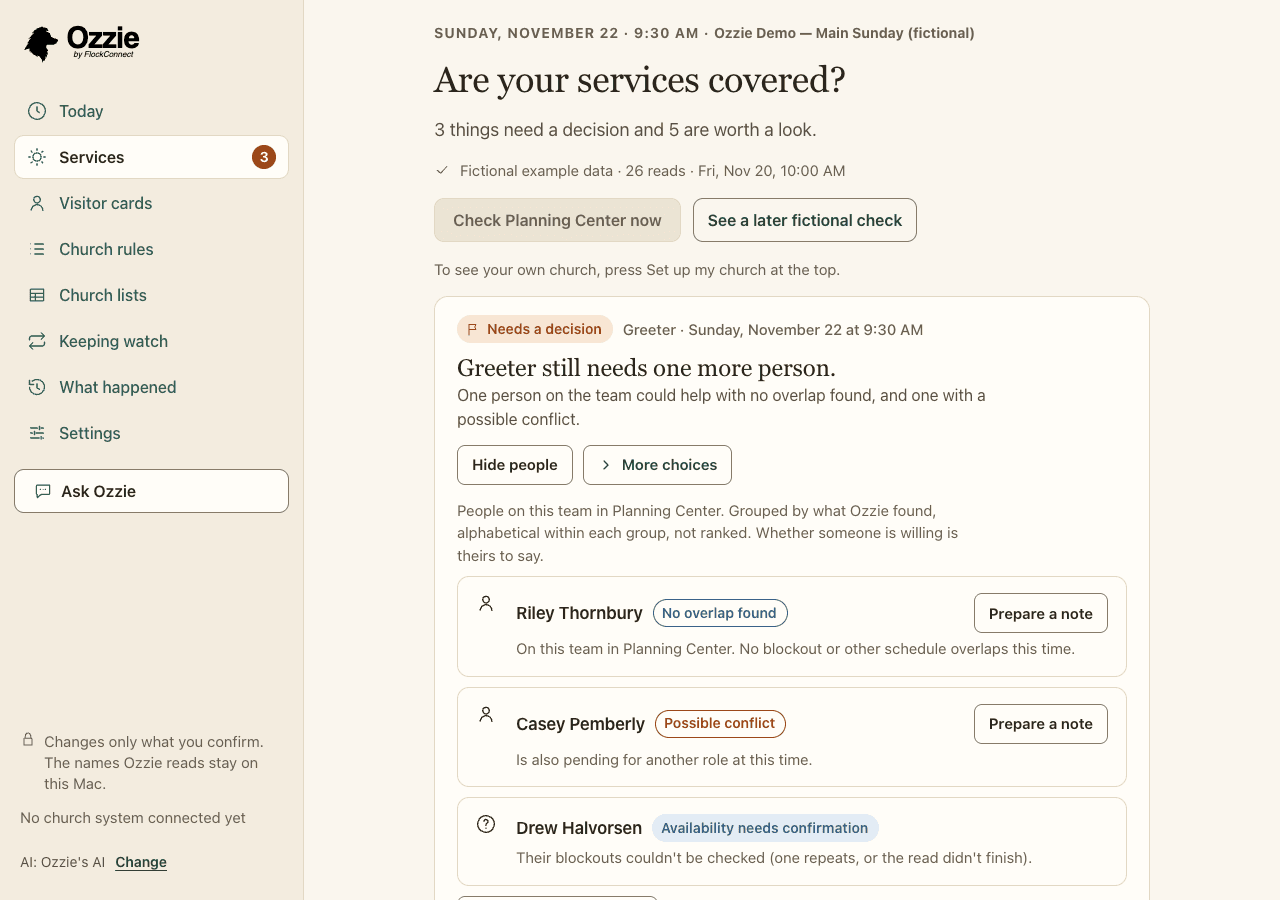
When something needs a decision, a discreet notice says so, with no names in it. Open Ozzie and the work is ready: the facts, where they came from, when they were checked, and a draft note if one would help.
With B1 Church or Breeze, Ozzie checks the one service it watches there on its schedule, tells you privately when something gets worse, and runs Keep services covered and the morning briefing for that service, without checking scheduled leads, kids teams or rooms; with Genesis, which shares no volunteer schedules, it reads Genesis on its schedule and says when a form has been filled in again.
What it checks
The questions behind “Are your services covered?”
Each finding is a fact with its source and the time it was checked. Anything uncertain is marked “Worth a look” with the reason, and Ozzie tells you what it didn't check.
Serving roles that still need someone
Which positions on your service's plan are still open, and who on that team could help: no overlap found, a possible conflict, or left out, with the reason for each. Nobody is ranked.
Requests waiting on an answer
People who haven't replied to a request yet, and requests that were prepared but never sent, so nobody is waiting on an email that didn't go out.
Several weeks in a row
Who has served a number of weeks in a row by your church's own rule, so a leader can check in. It's about care, not performance.
Rooms booked twice
Room bookings in Planning Center Calendar that overlap, including the setup time your church rules give a room.
Follow-ups with no owner
Welcome and follow-up cards in Planning Center People that have nobody assigned, so a guest doesn't fall between two desks.
Group nights that clash with serving
Planning Center Groups meetings that fall at the same time as someone's serving assignment.
Your church sets the rules: how many weeks in a row is worth a check-in, which rooms can't be shared, how much setup time a room needs. Findings follow your rules, not ours. With B1 Church or Breeze, Ozzie checks each serving role and who has answered, and with B1 Church who on the team could help. Genesis shares no volunteer schedules, so with Genesis Ozzie checks no service: it shows the events coming up, attendance once an event has ended, your groups, and how many times each form was filled in. Keep services covered and the morning briefing work with B1 Church and Breeze too; several weeks in a row, rooms, follow-ups and group nights work with Planning Center only for now.
From the founder
Watch the 4-minute demo
Michael Tribett, the founder of FlockConnect, walks through Ozzie over screens recreated from the app with a fictional church and invented people. From 2:48 there is music and no voice: the published Ozzie app runs on a test church with fictional people, showing a live check of Planning Center, “Why I flagged this”, a question answered by Ozzie's AI, adding one person to an open role in Planning Center as unconfirmed after a yes, taking that person off again, and “What happened”. Adding people works with Planning Center only and is off until a church turns it on; Ozzie sends that person nothing.
Music: Sascha Ende, ende.app (CC BY 4.0)
Read what's said
Michael Tribett's words, from the start to 2:48. In brackets, what the video shows on screen at that point.
It's Saturday night. Your service plans looked fine on Thursday. But now you're wondering: are our services covered?
Hi, I'm Michael Tribett, the founder of FlockConnect, and I am proud to present a brand new open source and free tool. Ozzie, an AI sheepdog for church admins. I built Ozzie to be Claude Code for church admins. It does the checking. You do the deciding.
It seamlessly connects to your Church Management system, such as Planning Center, B1 Church, Breeze or Genesis. Ozzie then reads and keeps track. It raises alerts but won't change anything unless you give the command.
It looks at every service you have planned on its own. Here, four things need attention across two services. Nobody even had to ask.
Every finding shows its work. Why it was flagged. Where the facts came from, and when it was checked.
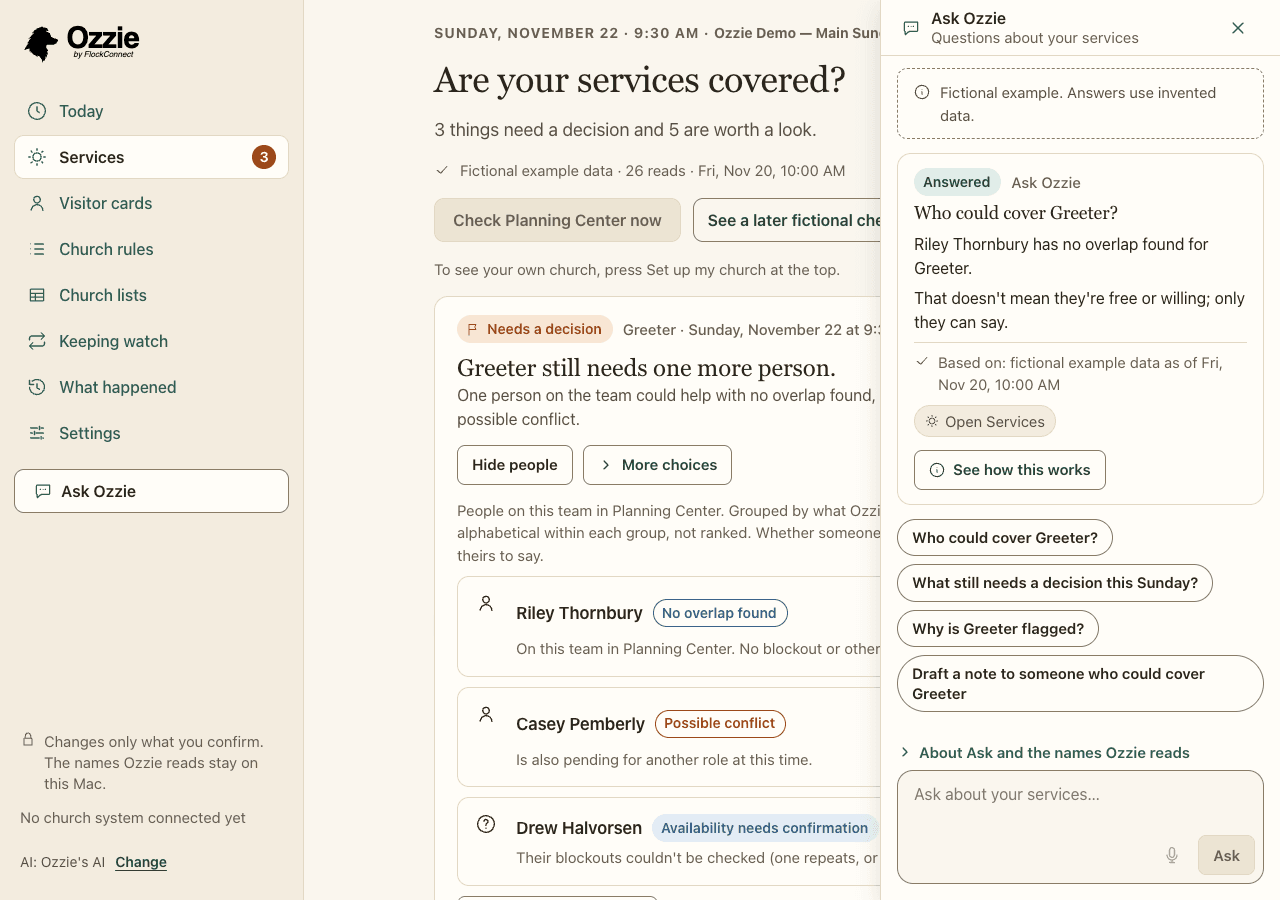
Simply ask in plain words. And here's the best part, your church data is safe, there is zero data retention: the names Ozzie read never reach a company like other AI services. [On screen: Zero data retention with Ozzie's AI. The names Ozzie reads stay on your Mac on every route.]
Ozzie drafts the note and all the AI sees is Volunteer A, not a real name. Nothing is sent automatically. You review, you decide, and you send it.
It even writes back and updates your Church Management system, for example your yes updates the volunteer in Planning Center. [On screen: Planning Center only today. Off until you turn it on.]
One change. You make the call and Ozzie does the rest.
It updates every hour, and alerts you privately when something needs your attention.
Ozzie is part of a bigger vision called FlockConnect. All of it has one simple goal. To free up pastors, admins and church leaders from systems, spreadsheets and planning, so they have more time with their people. More time to focus on discipleship.
More time leads to better relationships. And better relationships naturally lead to better discipleship. Let's make disciples and fulfill the Great Commission. Thank you.
From 2:48 to the end there is music and no voice: the published Ozzie app runs on a test church with fictional people, with these words on screen.
- See it for real.
- This is the real app. It checks Planning Center, live.
- Every finding shows why it was flagged, its source, and when it was checked.
- Ask in plain words.
- A real answer. The AI saw stand-ins, not the names.
- With adding people turned on, one person can be added to an open role.
- Ozzie checks Planning Center again, shows the change, and waits for a yes.
- Added as unconfirmed. Ozzie sent nothing.
- And it can be taken back.
- Every change is listed, with times.
25 seconds
The short version
A short film with music and on-screen words, and no voice. It opens with “Are your services covered?” and sets Ozzie beside an AI coding tool for developers. Its app screens are recreated from Ozzie with a fictional church and invented people: Ozzie checks the services on its own and says why a role is flagged, answers “Who could cover Greeter?”, and, after a person says yes, adds that volunteer to the role in Planning Center as unconfirmed; Ozzie sends them nothing. Adding people is off until a church turns it on.
Music: Sascha Ende, ende.app (CC BY 4.0)
What it never does
Ozzie prepares. People decide, and people go.
These aren't settings. No user, church or plan can switch them off. They live in the open source code, so they are the same whether you run Ozzie yourself or use Ozzie's AI.
- Send a message to anyone in your church. It drafts; a person sends.
- Change Planning Center on its own. It changes something there only when you confirm that one change, and it only reads B1 Church, Breeze and Genesis.
- Write a sermon, devotional or pastoral teaching.
- Pretend to offer pastoral care, counselling, prayer or presence.
- Score, rank or label a person, their faithfulness or their spiritual health.
- Make a pastoral decision, or act without a named person approving that exact step.
- Send the names it read from your church's system to an AI model.
- Present a guess as a fact. Anything uncertain is marked “Worth a look”, with the reason.
- Hide what it read, when it read it, or what it didn't check.
- Nag, or go around you to someone else. Ignoring Ozzie is always safe.
Privacy
How names stay off AI models
AI is optional. When you use it, to reword a draft, to ask about what Ozzie read, to look at who could help with a role from a card on your service's page, or to write up a job you set up, the AI sees placeholders instead of the names Ozzie read from your church's system:
Hi [Volunteer A], could you serve as [Role]?
The names are put back on your Mac after the reply comes back. Before anything leaves the app, a second check refuses any request that still holds a name Ozzie has shown you, an email address or a phone number. On Ozzie's AI, every request requires zero data retention.
Honest limit: Ozzie can only recognise names it has read. Please don't type other people's details into a question.
Open source
Free to download and run yourself
Download the Mac app, signed by FlockConnect LLC and notarized by Apple, and use it with your church's own Planning Center, B1 Church, Breeze or Genesis account, with no AI at all, your church's own AI key, or AI on your Mac. The app and every safety check are open source under the Apache-2.0 license, so you can read the code or build it yourself.
Ozzie's AI
$19 a month
Nothing to set up, no keys, and an honest pause instead of extra charges. About 400 answers a month, with zero data retention on every request. Cancel any time.
Questions
Frequently asked questions
Which church systems does Ozzie work with?
Planning Center, B1 Church, Breeze and Genesis. Ozzie checks the services it watches in Planning Center, B1 Church or Breeze. Genesis shares no volunteer schedules, so with Genesis Ozzie checks no service and never says one is covered: it shows the events coming up, attendance once an event has ended, your groups and how many times each form was filled in, and reads no one's name. Keep services covered and the morning briefing work with B1 Church and Breeze too. Siri and Shortcuts, other AI apps, the extra checks (rooms, follow-ups, groups, Check-Ins, Registrations and People forms) and Church rules for scheduled leads, kids teams and weeks in a row work with Planning Center only for now. Breeze doesn't share blockouts or how many people a role needs, so on Breeze Ozzie shows who is on each role instead of calling the service covered. Genesis can also be read beside any of the others, for its groups, events and forms.
Does Ozzie change anything in our church system?
Only when you confirm, and only in Planning Center. Unless your church turns on changes, Ozzie only reads: it makes a fixed list of read requests to Planning Center, B1 Church, Breeze or Genesis. With changes on, it can add one person you choose to an open role in Planning Center as unconfirmed, after you confirm that one change; the request waits for you to send in Planning Center. It never accepts, declines or edits anything there, the only thing it removes is a person it added, when you ask, and it never changes anything on its own. It has no way to change anything in B1 Church, Breeze or Genesis.
Does Ozzie send messages to our volunteers?
No. When a note would help, Ozzie drafts it. You read it, change it if you like, copy it and send it yourself from your own email or phone. Ozzie has no way to send a message to anyone.
Does the AI see our people's names?
The AI sees placeholders such as [Volunteer A] instead of the names Ozzie read from your church's system, and the names are put back on your Mac. A second check in the app refuses any request that still holds a name Ozzie has shown you, an email address or a phone number. Ozzie can only recognise names it has read, so please don't type other people's details into a question.
Do we have to use AI at all?
No. Every check and every draft works without AI. AI is optional help with wording and with answering questions about what Ozzie read. You can use your church's own AI key, AI running on your own Mac, or Ozzie's AI, where every request goes only to AI services that keep none of it (zero data retention).
Does Ozzie rank or score volunteers?
No. When a role needs someone, Ozzie lists the people on that team in alphabetical order with the reason for each: no overlap found, a possible conflict, or left out and why. Whether someone is willing is theirs to say. Ozzie never scores, ranks or labels a person.
Does Ozzie keep watch when my Mac is off?
Not yet. Ozzie runs on your Mac. It keeps watch while your Mac is awake and Ozzie is running, including with its window closed, and it tells you about checks it missed while the Mac was asleep. Checks that run when your Mac is off are planned as a paid service later.
What does Ozzie cost?
Ozzie is free to download and run yourself, and it is open source. Ozzie's AI, with nothing to set up, is $19 a month.
Which computers does Ozzie run on?
Ozzie is a Mac app for Apple Silicon Macs running macOS 14 or later. It is an early build. Anyone can download it free from ozzie.church/download; that copy is signed by FlockConnect LLC and notarized by Apple. You can also build it yourself from the open source code.
Is Ozzie made by Planning Center, B1 Church, Breeze or Genesis?
No. Ozzie is an independent app by FlockConnect that reads your church's Planning Center, B1 Church, Breeze or Genesis account with your permission. It is not affiliated with or endorsed by any of them.
Why “table work”? In Acts 6, practical work was handed to trustworthy people so that prayer and the Word stayed first. Ozzie takes on a church's computer table work in that spirit, and leaves the people work to people.